How do you tailor one resume without starting over?
Keep a reliable base resume, choose evidence relevant to each job, and save a named version before moving to the next application. Change the emphasis, selection and wording of true experience. Keep your identity, employment dates, qualifications and actual responsibilities consistent.
This approach follows Harvard's resume guidance: tailor the resume to the position and emphasize the skills the employer values. The same guide recommends specific, factual language. That supports the writing principles here; it is not an endorsement of ResumeForU or evidence of a guaranteed hiring result.
In ResumeForU, named job versions preserve variations within one saved resume. That lets you return to a previous version without maintaining a separate purchased resume for every application. The workflow below combines an illustrative writing example with the product's save-and-restore controls.
Start with a base you can trust
Gather your roles, projects, education, skills and achievements in one place. For each claim, keep enough detail to explain what you did and how you know the result. If you do not have a measured outcome, use a concrete description of the work rather than inventing a percentage.
Your base is a working source, not necessarily the document you submit everywhere. It may contain more evidence than a particular role needs. Check contact details and chronology once, then review them again when a material fact changes.
CareerOneStop's targeting guidance describes keeping a master resume and tailoring copies to a job and organization. Our named-version workflow applies that principle within one ResumeForU resume.
In the builder, save a named version such as Base - October 2026 before making role-specific changes. A clear base gives you a stable starting point and reduces the chance that yesterday's tailoring becomes tomorrow's accidental default.
Read each posting for evidence you can actually provide
Identify the core responsibilities, required skills and practical constraints in the posting. Then connect each relevant requirement to something you have done. Separate genuine requirements from preferences so you can see where your experience fits and where it does not.
Use a small working table:
| Posting asks for | Evidence in your history | What to change in the resume |
|---|---|---|
| SQL reporting | A project that queried transaction data | Give that project space and describe the query work |
| Customer communication | Weekly updates to nontechnical users | Move the relevant bullet earlier |
| API development | An internship implementing endpoints | Lead with the endpoint work and name the technology used |
| A certification you do not hold | No supporting evidence | Do not add the credential |
This table is an illustrative planning tool. It is not an instruction to repeat every phrase from the posting. Use the employer's terminology when it accurately describes your experience, and make the supporting work easy to find.
Tailor the summary, evidence and order
Begin with three areas: the summary or headline, the most relevant bullets, and the order of skills or sections. Avoid rewriting the whole document when these changes explain your fit clearly.
A summary should point to evidence below it. If you describe yourself as experienced in reporting, the reader should find reporting work in your roles or projects. Our summary-writing guide explains how to replace broad claims with a specific introduction.
Within a role, lead with the work most relevant to the posting. Keep context around tools: “SQL” in a skills list is less informative than a bullet explaining what you queried and why. The project-bullet guide shows how to turn work into concise evidence.
Do not silently change an official job title to claim a position you did not hold. You can explain relevant responsibilities in the bullets or an accurate descriptive phrase. Likewise, keep completed, pending and in-progress qualifications clearly distinguished.
Worked example: one resume for three applications
The following candidate and project are fictional teaching examples. Do not copy the details as your own experience.
Suppose the base resume contains this project note:
Built a volunteer scheduling application using TypeScript and PostgreSQL, added input validation to three API endpoints, and created a weekly SQL report of unfilled shifts for coordinators.
For a backend developer application, the candidate could lead with:
Implemented input validation for three scheduling API endpoints using TypeScript and PostgreSQL.
For a reporting analyst application, the candidate could lead with:
Created a weekly SQL report of unfilled volunteer shifts for scheduling coordinators.
Both versions select facts already present in the base. Neither adds a result such as “reduced staffing gaps by 40%” without evidence. If the posting requires a tool the candidate has not used, substituting that tool's name would change the facts rather than tailor the resume.
For an application support role, the candidate could lead with:
Built a volunteer scheduling application and created a weekly report to help coordinators identify unfilled shifts.
This third version emphasizes the users and operational information already described in the base. It does not invent support tickets, customer service experience or an improvement metric.
| Application | Named job version | Evidence to lead with | Example submitted file |
|---|---|---|---|
| Backend developer | Maple - Backend | TypeScript input validation and three API endpoints | Alex-Chen-Maple-Backend.pdf |
| Reporting analyst | Cedar - Reporting | Weekly SQL report of unfilled shifts | Alex-Chen-Cedar-Reporting.docx |
| Application support | Birch - Support | Scheduling application and information for coordinators | Alex-Chen-Birch-Support.pdf |
These companies, filenames and application requirements are illustrative. Choose the actual employer's requested format. Restore the base before creating each variation so that yesterday's emphasis does not accidentally carry into the next application. Save the named variation, restore it when needed, export it and record the file you submitted.
All three named versions fit within one purchased resume's 20-version allowance. At the price checked on 19 October 2026, this workflow costs $9.99 USD once, with no per-application or per-export charge. Creating three independently saved resumes instead would require three purchases. See current pricing and inspect the fictional export samples before deciding.
Save job versions in ResumeForU
- Open your existing resume. Use the resume you intend to keep tailoring, rather than starting a new independently saved resume for each job.
- Preserve the base. In the Review step, open Job versions or Save a job version. The dialog is titled Job versions & history. Enter a descriptive name and choose Save job version.
- Tailor the current resume. Adjust the summary, relevant bullets and presentation for the first posting. Review the complete preview after editing.
- Save the tailored state. Use a name such as
Maple - Backend Developer - 2026-10-16. Wait for the save confirmation and check that it appears in the list. - Export and inspect. Download the requested format from the current resume, then keep a copy with a clear filename.
- Return to a suitable starting point. Reopen Job versions & history and select Restore beside the base or another relevant version. Review the loaded content before tailoring the next application.
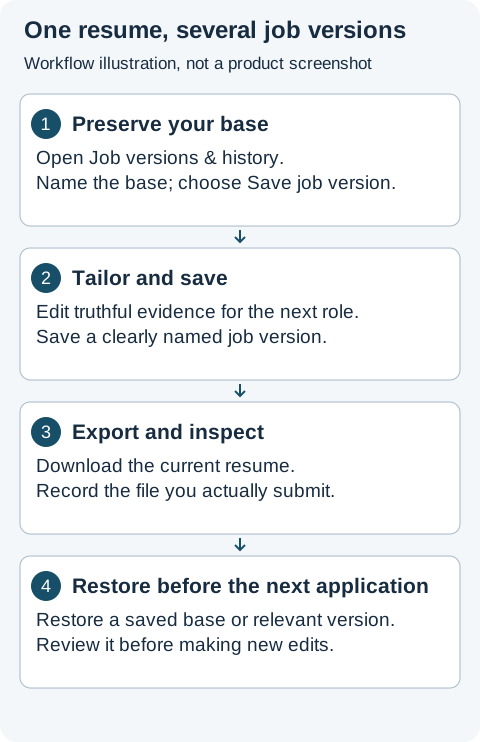
Workflow illustration, not a product screenshot. The numbered instructions above explain the same controls and sequence. Export the current resume after confirming which version is loaded.
Saving a version preserves a snapshot; it does not create a second working editor. Restoring changes the current resume to that saved state. Save any current variation you want to keep before switching. The interface also offers replacement of a selected named version, so check whether you are saving a new version or replacing an old one.
ResumeForU supports 20 named job versions within a resume. When those slots are full, the dialog offers deletion or replacement. Keep local copies of submitted files before removing a version you may want to review later. Automatic recovery points are separate from deliberately named application versions.
Does every application need another purchase?
No. Under the current ResumeForU purchase scope, edits and exports of named versions within one purchased resume remain included while the service operates. An additional independently saved resume requires its own purchase. The distinction is between versions of that resume and separate resumes, not the number of employers you contact.
Use the pricing comparison if you are choosing a tool around this workflow. You can build and preview free; clean PDF, Word and TXT resume exports require purchase.
Keep the submitted file tied to the application
Use a filename such as Alex-Chen-Maple-Backend-2026-10-16.pdf. In your own application record, note the company, job title, posting link, date and submitted filename. A saved resume version records content; it does not, by itself, tell you whether you submitted an application or received a reply.
Before sending, confirm the version is correct, the file format meets the posting's instructions, and no summary or filename names the previous employer. Open the actual download and follow the PDF and Word export checks. Inspect automatically filled application fields where available.
When is the resume tailored enough?
Stop when a reader can quickly find truthful evidence for the role's main requirements and the exported file is ready to use. More keywords are not a substitute for relevant experience. If an important requirement is unsupported, acknowledge that gap to yourself rather than rewriting unrelated work to imply expertise.
You now have a repeatable sequence: preserve a base, select evidence, save the variation, export, inspect and record what you sent. Open the builder to continue your existing resume, or use a resume example to understand the structure before replacing its fictional details with your own.