What do the resume files look like?
Download the same fictional graduate resume in three formats. No account or purchase is required for these samples. Your own clean resume exports require the core purchase.
- Download the fictional resume PDF
- Download the editable Word sample (DOCX)
- Open the plain-text sample (TXT)
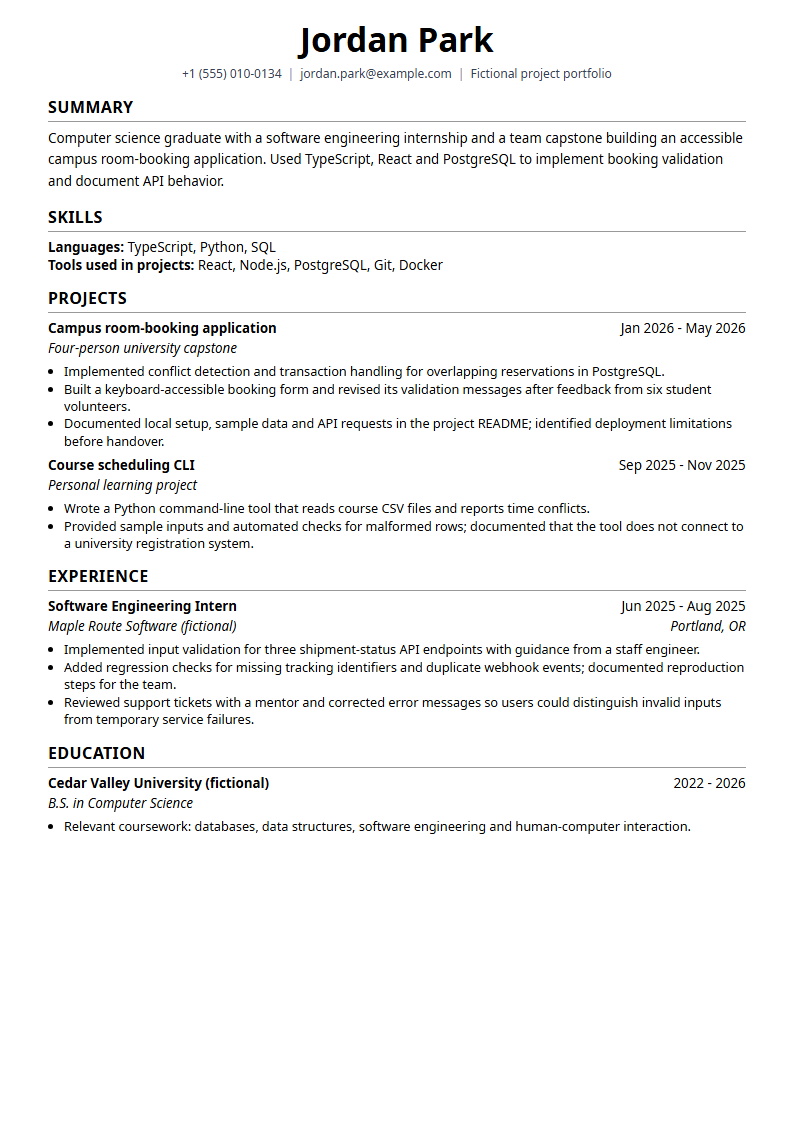
The candidate, employers, university and accomplishments are fictional teaching material. Do not submit this sample as your own. Its content comes from our graduate software engineer example.
What does this sample demonstrate?
| Format | What to inspect |
|---|---|
| Fixed-page presentation, readable text, section order and page breaks | |
| Word | Editable paragraphs and headings; inspect pagination in your own word processor |
| TXT | Plain content without visual styling; useful for checking and copying text |
The PDF was generated on 19 October 2026 from the current Minimal HTML template using the local rendering helper and Chromium. The helper uses system-font stacks rather than the hosted service's complete font setup. It is an illustrative local template render, not an exact reproduction of a future purchase or a benchmark of the production renderer. The DOCX and TXT samples use the same export functions as the corresponding application downloads.
Word is an editable presentation of the content. It does not reproduce the PDF template's exact styling or necessarily its section order. Inspect each file separately. The samples do not prove universal ATS compatibility, employer acceptance or better hiring outcomes.
How should I check my own resume?
- Build or import your resume and replace all example details with your own accurate experience.
- Compare templates and inspect the free watermarked preview with your content in place.
- Check the employer's file instructions and the current price and included features. Pay through Stripe only when you are ready to export; guest checkout is available.
- Open the actual download. Review page breaks, dates, links and reading order. Check application fields after uploading.
Follow the exported-text checklist for a practical inspection. Our export-fidelity guide also includes historical research artifacts; those measure a different experiment and should not be treated as competitor output comparisons.
Which tool should I use?
Use the resume.io comparison for billing and scope, the Canva comparison for design versus guided editing, or the ChatGPT guide for writing help and document workflows. A free tool may already meet your needs. ResumeForU is an option when its structured editing, named job versions and included formats make the purchase useful to you.