What should survive a resume export?
Your name, contact details, employment history, dates and relevant evidence should remain complete and understandable in the file you send. PDF aims to preserve a finished page layout. Word keeps the document editable, with page layout that can change when it opens in another environment. Neither extension alone tells you whether the content survived correctly.
There are three separate things to inspect: what the page looks like, what text can be extracted, and what information an application form puts into its fields. A good result in one does not establish a good result in all three.
Microsoft's PDF export guidance describes PDF as a format for consistent appearance across most computers. Its PDF-to-Word guidance explains that conversion attempts to reconstruct the document and may not match the original layout. These are format characteristics, not evidence that a particular resume will parse correctly.
Our existing PDF versus Word format guide helps you choose which file to send. This article focuses on what happens after export and what the original ResumeForU PDF research can actually show.
Layout, text and meaning are different checks
| Element | In a PDF export | In an editable Word export | What to check |
|---|---|---|---|
| Page layout | Intended to retain fixed pages | Can reflow with fonts, editor and document settings | Page count, wrapping and headings separated from content |
| Words | Visible text and extracted text may differ | Text remains editable, but still needs inspection | Missing characters, merged words and duplicated content |
| Role and date relationships | Extraction may separate visually adjacent items | Document structure still affects how information is read | Keep each date with its company and role |
| Links | A visible label and its destination are separate | Editable link text and destination can differ | Open each link and confirm its destination |
| Selected content | Depends on what the export includes | Depends on what the export includes | Check hidden sections and the loaded job version |
For example, seeing “Portfolio” on the page does not prove the link opens the correct website. Finding every date in copied text does not prove each date is attached to the correct job. Review relationships as well as individual words.
Greenhouse documents possible parsing problems with image-based resumes, columns and complex formatting. It also distinguishes a failed parse from the file remaining attached to a candidate. That supports inspecting extracted fields; it does not establish an automatic rejection rule or describe every ATS.
What our original PDF research measured
The published PDF text-extraction dataset contains three synthetic resumes rendered in five layouts through two PDF engines in July 2026: 15 fixture/layout combinations and 30 PDF files. It retains PDFs, shared HTML inputs, extracted text and scoring details.
It is a historical comparison of Chromium and WeasyPrint output. It is not a PDF-versus-DOCX benchmark, a test of the current ResumeForU release, or a measurement of employer acceptance. No new benchmark was run for this article. Word documents were not part of that dataset, so the results cannot establish that PDF is better or worse than Word.
That limited scope still makes the artifacts useful. Instead of assuming that a page which looks readable will produce readable text, you can inspect a specific example of an export boundary problem.
A retained example: four skills become one string
In the standard Professional-template case, the archived Chromium extraction includes:
Languages: TypeScript Go Python Rust
The corresponding WeasyPrint extraction includes:
Languages:TypeScriptGoPythonRust
These are retained results, not invented illustrations. Compare the Chromium extracted text and WeasyPrint extracted text, alongside the dataset's explanation and original PDFs.
Inspect the original pages
The images below render page one of the two retained PDFs. They show the visible document, while the text excerpts above show the archived extraction result. The applicants and experience are synthetic teaching material. These are July 2026 research artifacts, not screenshots of the current product or a new engine comparison.
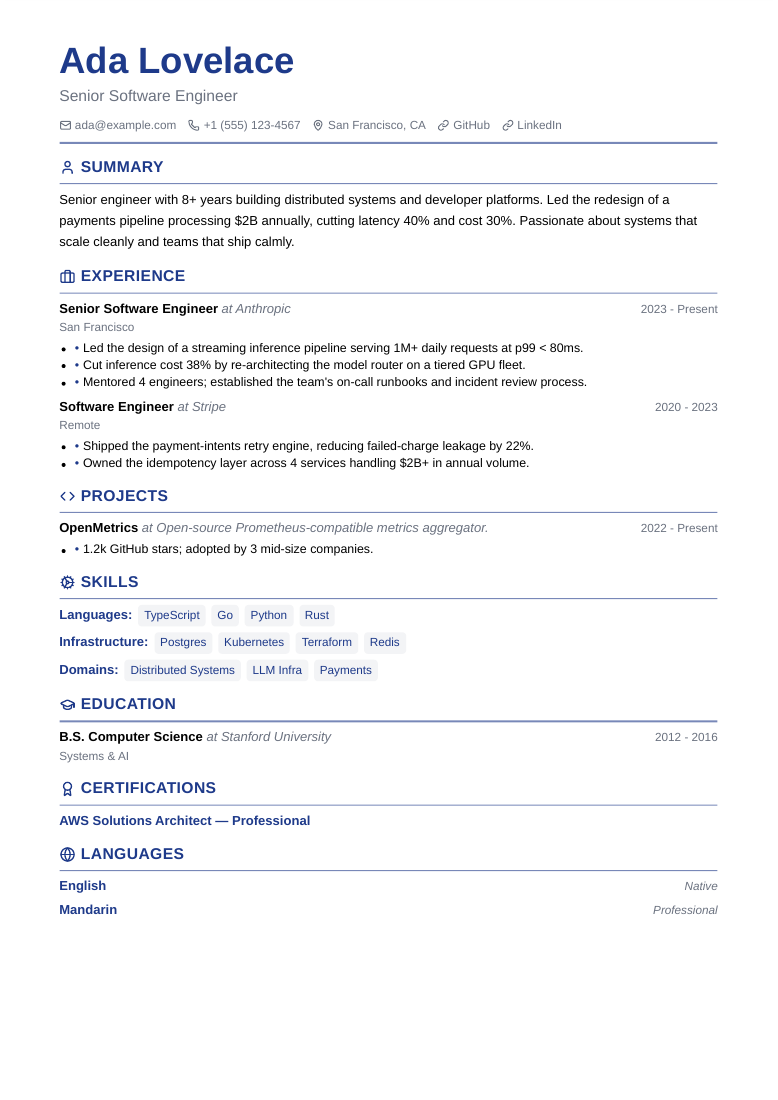
Chromium, standard Professional fixture. Open the full original PDF and compare it with the extracted text linked above.
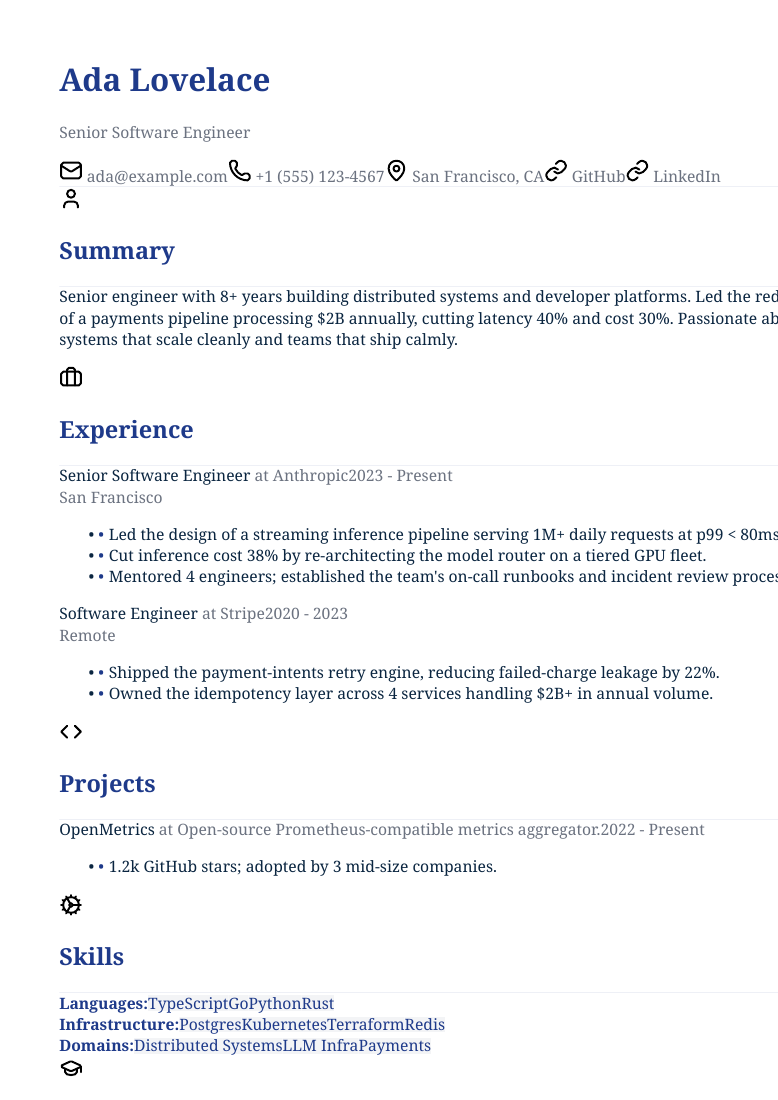
WeasyPrint, the same fixture and layout. Open the full original PDF. A page image alone cannot demonstrate text extraction quality.
The WeasyPrint page also visibly runs text past the right edge. The image preserves that historical output rather than correcting it. This observation belongs to this retained case; it is not a claim about every WeasyPrint document or current versions of either engine.
The observable problem is missing separation between skill names. This extraction path produced joined words. It does not tell us that a recruiter rejected the file, that every parser would read it this way, or that all documents from either engine behave alike.
For your own resume, a reasonable response is to try explicit text separators or a simpler layout, export again and compare. That is a suggested troubleshooting step, not a fix measured by the historical dataset. The useful habit is checking the result of a change rather than assuming it worked.
What the research scores leave out
The published methodology defines several narrow checks. Word integrity counts matched unique words from selected fields. Section-title checks look for headings; they do not establish section order. The contact check includes visible link labels but does not verify hyperlink destinations. Unicode coverage uses nine selected tokens, not every language or character.
The long-resume continuity check looks for a marker and opening phrase. It does not prove that an entire bullet, or every page break, remained intact. Normalization also removes some whitespace differences before scoring.
Those distinctions explain why a percentage should not replace inspection. A document can contain expected words while presenting them in an unhelpful order. Read the metric definitions and limitations when interpreting the results, and see our methodology for the boundary between content checks and employer screening.
How ResumeForU's PDF and Word exports differ
ResumeForU's PDF is the styled resume artifact. Its Word export builds an editable document from the resume content, using document headings, role lines and bullet lists. The Word export does not reproduce the chosen PDF template's styling. A different page count or appearance is therefore not, by itself, evidence of missing content.
Compare the facts and visible sections in both files. If a role appears in the PDF but you cannot find it in Word, investigate the discrepancy. If the same role is present but wraps differently, review the Word layout before sending it. TXT provides another view of the resume content, but a successful TXT export does not demonstrate that text extraction from the PDF will succeed.
PDF, DOCX and TXT exports are included with the core resume purchase. Inspect the format you will actually submit rather than treating another export as its substitute.
A practical export inspection
- Finish your edits and load the intended job version. Confirm the summary, skills and section visibility belong to this application.
- Export the requested format. Follow the posting's requirements before considering your preferred appearance.
- Open the downloaded file. Inspect every page at a readable size. Check names, dates, bullet endings and page breaks.
- Inspect the text separately. For PDF, copy text into a plain-text editor and compare its order with the page. For Word, review the document's actual text and layout in your editor.
- Check links. Confirm both the visible address or label and the destination.
- Review the employer's upload result. Correct populated fields where the application permits it, then submit the checked file.
The worked exported-text checklist gives a fuller example of a date becoming separated from its role. Save the submitted file so you can review the same content before an interview.
Common export questions
If I can copy text from a PDF, is the resume ready?
Selectable text is a useful first check. You still need to look for missing words, mixed reading order and incorrect populated fields. Copying text from one viewer does not certify every parser.
Does a different Word layout mean the export failed?
Not necessarily. Check whether the intended content is complete, whether its relationships are clear, and whether the document is readable. For ResumeForU, editable Word output intentionally differs from the styled PDF.
Does this research prove PDF or Word preserves more content?
No. The retained experiment compared two PDF engines; it did not include Word exports. Use it to understand a documented extraction failure, then inspect your own output. For the separate decision about which file to submit, follow the employer-format decision guide.