How do I check the text in my exported resume?
Open the final file, copy its text into a plain-text editor and compare it with the visible document. Check that your name, contact details, role titles, dates and bullets remain complete and in a sensible order. Then review any fields the employer’s application fills after upload. A successful copy-and-paste check is useful evidence about that extraction path; it does not certify all hiring software or predict a screening result.
For one documented vendor example, Greenhouse’s parsing guidance identifies columned layouts, unclear sections and image-based resumes as possible parsing problems. It explains that a failed parse can leave the file attached while details need manual entry. The walkthrough below is our illustrative checking exercise, not a claim that every parser behaves like Greenhouse.
Use the exact file you will submit
For a real retained example rather than the invented walkthrough below, see our export-fidelity research explanation. It includes original PDF pages and extracted text showing four skill names losing their separators, with the experiment's limits stated alongside the evidence.
Export after your final edits and open that downloaded file. Checking the builder preview or an earlier draft can miss new wrapping, page breaks or omitted text. Follow the employer’s file-format instructions; the PDF and Word comparison explains the tradeoffs. ResumeForU includes PDF, Word (DOCX) and TXT exports with the core resume purchase. Choose the requested format and inspect its downloaded file separately; Word and PDF layouts can differ.
- Select a sentence to confirm the PDF contains selectable text. If you cannot select it, investigate whether the file is an image or your viewer restricts copying.
- Select the document’s text and paste it into a plain-text editor, such as Notepad. Check both pages when the resume spans more than one.
- Compare the pasted version against the PDF from top to bottom. Look for missing words, duplicated lines and sections appearing inside other entries.
- Check a role with a long title, a dated entry, each contact detail and any project link. Spot checks alone can miss a later-page error.
- Upload where requested and inspect automatically filled fields. Correct mistakes before submitting if the application allows it.
Keep the pasted text for your own comparison. You do not need to share personal contact details to perform this check.
Worked example: a date separated from its role
The following is invented teaching material. It is not a result from a specific ResumeForU template or a benchmark.
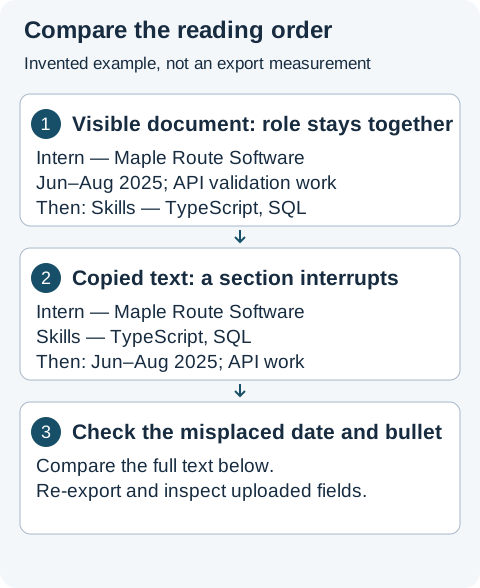
Annotated illustration of the invented example. The complete text versions below show the precise order difference; the image abbreviates the wording for readability.
The visible document shows:
EXPERIENCE
Software Engineering Intern — Maple Route Software
Jun 2025 – Aug 2025
Implemented input validation for three shipment-status API endpoints.

SKILLS
TypeScript, SQL, PostgreSQL
One viewer’s copied text could instead look like:
EXPERIENCE
Software Engineering Intern — Maple Route Software
SKILLS
TypeScript, SQL, PostgreSQL
Jun 2025 – Aug 2025
Implemented input validation for three shipment-status API endpoints.
The words are present, but the order separates the date and bullet from the role. That is a reason to inspect the layout and uploaded fields. It is not proof that an employer would reject the application.
Try a layout with a simpler reading order, shorten an unusually long title without changing its meaning, or adjust content spacing. Re-export and repeat the same comparison. A useful result keeps the role, company, dates and description together, as in the first version. If the application still misassigns dates, enter the correct values in its fields where permitted.
What should I look for besides reading order?
| Check | Example of a problem | Practical response |
|---|---|---|
| Contact details | Email is missing a character | Compare with the source, correct it and re-export; check the application’s email field too |
| Credentials and status | “Pending” appears away from the license entry | Keep status with the credential and verify both copied text and uploaded fields |
| Role boundaries | A prior job’s date appears under the next role | Inspect wrapping and page breaks; compare a simpler layout |
| Symbols and names | An accented name or bullet character becomes unreadable | Check the spelling and surrounding words after export; use a supported character or format where needed |
| Project links | A short label copies but no usable URL appears | Confirm the destination in the PDF; make the address available when the application requests a text URL |
| Page breaks | A heading is at the bottom of one page and all its content starts on the next | Adjust spacing or content and inspect the new export at normal reading size |
Do not assume a second viewer’s different output means one result is universally correct. It shows that extraction varies. Use the employer’s actual populated fields as an additional check when available.
Can the free checker inspect this PDF problem?
The free resume checker evaluates pasted text or text extracted from PDF, DOCX, TXT or Markdown files against a content checklist. File input does not make it a visual layout validator: it does not inspect the rendered columns, font appearance or page breaks, and it cannot guarantee which job an employer's parser will associate with a date. Use it alongside the document comparison to find content omissions; do not treat a higher score as proof that reading order is correct.
The methodology separates extraction evidence from employer screening. For the broader meaning of readable formatting, see what ATS-friendly means.
When is the check finished?
Finish when you have inspected the final export, resolved material omissions or order problems you can identify, and checked the uploaded fields where available. A changed template or a later content edit creates a new file to inspect. You do not need to chase a universal parsing guarantee that this check cannot provide.
Practice with the graduate software engineer sample for project and internship entries or the new graduate nurse sample for supervised placement and credential-status wording. Replace fictional details before using a sample in an application.