What does ATS-friendly mean?
An ATS-friendly resume presents contact details, experience, education and skills in a document with selectable text, standard section headings and a predictable top-to-bottom reading order that hiring software can extract and people can read. It is a document-formatting goal, not a vendor certification or a promise that an application will advance.
An applicant tracking system helps an employer manage applications. Parsing transfers information from a resume into fields. Screening evaluates an application against the employer’s requirements. A readable document can still fail to meet those requirements.
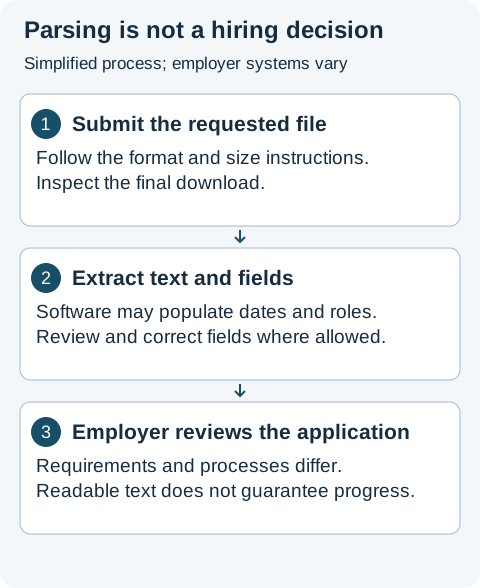
Simplified process diagram, not a model of every ATS. Submit the requested file, review extracted text and fields where available, and distinguish those checks from the employer’s screening and review.
ATS-friendly formatting rules at a glance
| Element | Practical formatting choice | What to check before submitting |
|---|---|---|
| File format | Text-based PDF or editable Word (.docx), matching the job posting |
Confirm the posting accepts the format and that text is selectable, not a scanned image |
| Section headings | Conventional labels (Experience, Education, Skills, Projects, Certifications) |
Check that headings appear on their own lines above the entries they describe |
| Reading order | Single-column flow or layouts whose extracted text keeps each role, date and bullet together | Copy and paste the full PDF into a plain-text editor to verify nothing interleaves |
| Contact details | Email, phone, location and profile links in normal body text near the top | Verify email and phone copy cleanly without missing characters or broken separators |
| Dates and titles | Consistent month/year or year ranges paired clearly with each employer and role | Ensure dates stay attached to the right role when pasted as plain text |
| Typography & symbols | Embedded standard fonts and ordinary bullets (• or -) |
Check accented characters, punctuation and skill separators in the extracted text |
Start with the employer’s instructions
Use the requested file format and size limit. If PDF and DOCX are both accepted, choose the version that preserves your content and reads correctly after upload. See our PDF and Word comparison.
Check the file you will actually submit
- Open the final document and select a sentence. A screenshot of text is different from text stored in the document.
- Copy it into a plain-text editor. Check your name, email, job titles, dates and section boundaries.
- Read the result in order. Watch for skills appearing halfway through a job entry or dates separated from their role.
- Check symbols, accented names and hyperlinks. A document can look correct while extraction loses characters.
- After uploading, review any fields the application fills automatically and correct errors.
Selecting text is a useful first check, but it does not prove that every field will parse correctly. Software, document construction and employer settings differ.
For an annotated example, follow the exported-text walkthrough. It shows a fictional role whose date and bullet are separated by a skills section, explains what that observation establishes, and gives a repeatable comparison after re-exporting. Check the complete document, not just the first few lines: a correct contact header does not prove later entries retain their boundaries.
Which formatting choices deserve attention?
Use recognizable headings such as Experience, Education and Skills. Keep key details in ordinary document text. Complex columns and layout tables deserve extra checking because reading order may differ from the visual arrangement. Greenhouse documents parsing problems and explains that an unsuccessful parse can leave a resume attached while requiring manual field entry. It does not mean automatic rejection. Greenhouse parsing guidance.
If you are comparing layouts before you write, use our ATS-friendly resume template checklist and template selection guide.
How ResumeForU approaches formatting
ResumeForU exports PDFs with selectable text using Chromium print-to-PDF and provides layouts with clear section headings, alongside native editable Word (.docx) and plain-text (.txt) exports. Its methodology and July 2026 PDF extraction dataset distinguish PDF extraction checks from employer-specific screening. We do not claim certification by ATS vendors or a universal pass rate.
Try the free resume checker for a content checklist. It accepts pasted text or extracts text from PDF, DOCX, TXT and Markdown files. It does not visually validate fonts, columns or page breaks, and it does not guarantee reading order or how an employer's software assigns fields. Use it alongside the file checks above.
Does a higher checker score mean more interviews?
No. A score summarizes that tool’s rules. It cannot know an employer’s candidate pool, eligibility criteria or hiring decision. Improve clarity and provide relevant evidence; do not invent qualifications or add irrelevant keywords to raise a score.
Browse resume examples by profession and adapt the advice to your own experience.